Virtual Bling: A Guide to Diamond Size on Hand Simulators
Why a Diamond Size on Hand Simulator Online Changes Everything About Ring Shopping
Using a diamond size on hand simulator online lets you see exactly how a diamond will look on your finger — before spending a cent. Here's what you need to know at a glance:
| What You Want to Know | Quick Answer |
|---|---|
| What does a 1 ct round diamond look like? | About 6.5 mm across — roughly the size of a pencil eraser |
| Why does size look different in photos? | Stock photos use tiny size 4–5 model hands, making stones look bigger |
| Which shape looks largest on the finger? | Marquise, followed by oval and pear |
| How do simulators work? | They use real mm measurements + your ring size to show true scale |
| Do I need to calibrate my screen? | Yes — enter your screen's diagonal size in inches for accurate results |
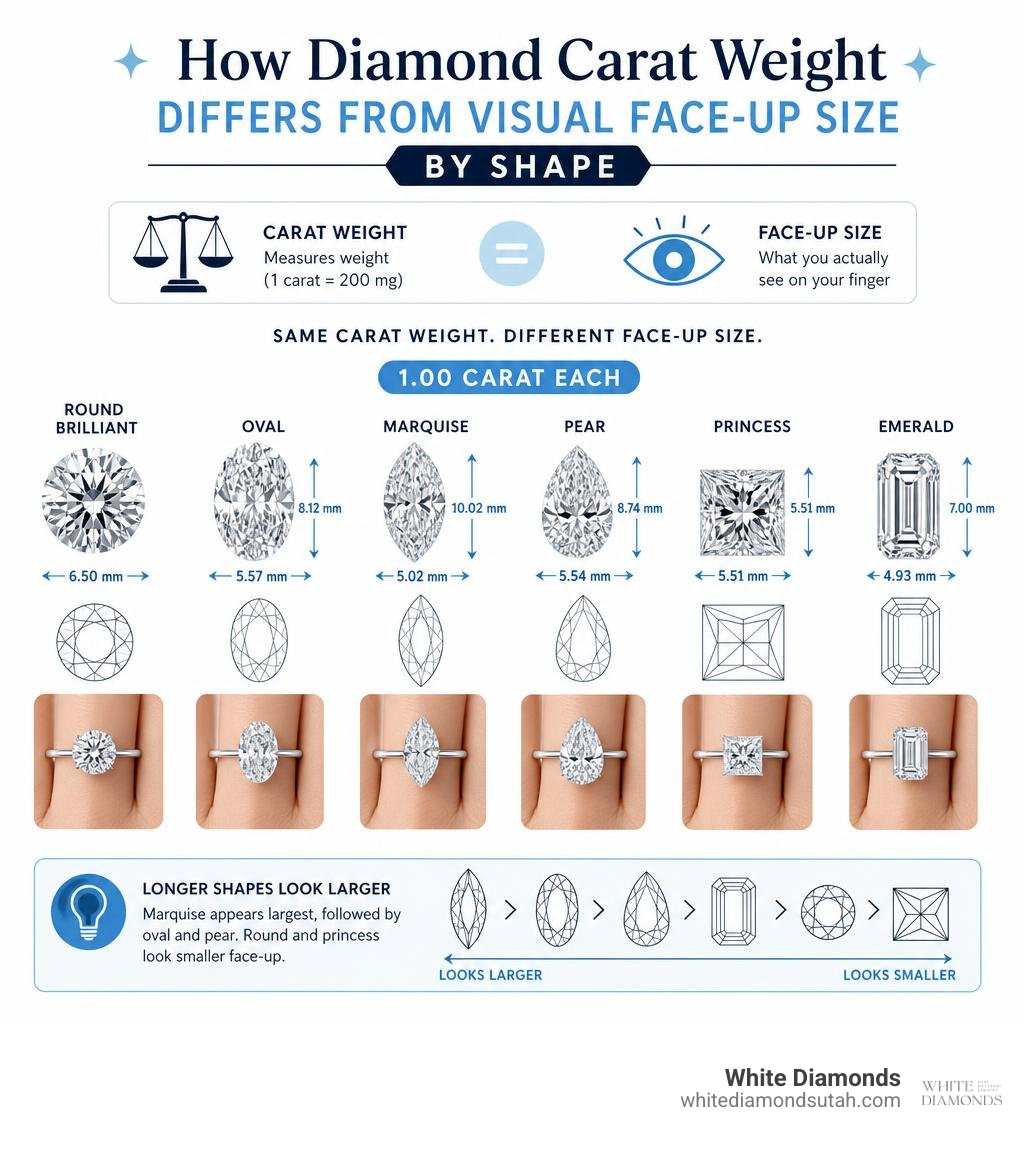
Here's the honest truth most jewelry ads won't tell you: carat weight has nothing to do with how big a diamond looks on your hand. A 1.00 ct princess cut measures only 5.51 mm across its face, while a 1.00 ct oval stretches to about 8.12 mm in length — yet both weigh exactly the same. Without a simulator, that difference is almost impossible to picture from a product photo alone.
And those beautiful ring photos on jewelry websites? Most are shot on a size 4 or 5 model hand. If your finger is a size 7 or 8, that same stone will look noticeably smaller in real life.
At White Diamonds, we've spent years helping couples navigate exactly this kind of confusion — crafting custom engagement rings and wedding bands where the fit and look feel just right. Our hands-on experience with diamond sizing and finger coverage makes us uniquely placed to walk you through how to use a diamond size on hand simulator online with confidence. Let's break it all down, step by step.
Why Carat Weight and Visual Size Are Not the Same
When people first start exploring engagement rings, they often treat "carat" and "size" as interchangeable terms. They aren't. Carat is strictly a measure of weight (one carat equals exactly 200 milligrams).
How that weight is distributed is what determines the diamond's physical dimensions and its "face-up area"—the total surface area you actually see when looking down at the ring. The physical dimensions (length and width in millimeters) dictate the true visual footprint of the stone.
This visual footprint is heavily influenced by "cut spread" and "depth percentage."
- A deep-cut diamond hides much of its carat weight in the bottom half (the pavilion) of the stone. While this weight shows up on a grading certificate, it remains invisible once set in a ring. This can cause the diamond's face-up size to look up to 10% smaller than average.
- A shallow-cut diamond spreads its weight outward, resulting in a larger physical diameter. While a shallow stone faces up larger, it often sacrifices the diamond’s light performance, leading to a dull, glassy appearance.
Understanding this balance is crucial. If you want to dive deeper into how depth affects a stone's light return, check out our Ultimate 1 Ct Diamond Engagement Ring Guide.
To see how these visual differences play out across different shapes of the exact same carat weight, we can use geometric calculations like those found in the Diamond Ring Size to Carat Appearance Calculator . Below is a comparison of typical dimensions for a 1.00-carat weight across popular diamond shapes:
| Diamond Shape | Typical Millimeter Dimensions | Approximate Face-Up Area ($mm^2$) | Visual Impression |
|---|---|---|---|
| Round Brilliant | 6.50 x 6.50 x 3.92 mm | ~33.2 $mm^2$ | Baseline standard for visual size |
| Oval | 8.12 x 5.41 x 3.30 mm | ~34.5 $mm^2$ | Appears significantly larger and longer |
| Princess | 5.51 x 5.51 x 3.97 mm | ~30.4 $mm^2$ | Faces up smaller due to square footprint |
| Emerald | 6.68 x 4.95 x 3.22 mm | ~29.8 $mm^2$ | Elegant, long, but smaller face-up area |
| Marquise | 10.00 x 5.00 x 3.10 mm | ~37.5 $mm^2$ | Largest visual footprint per carat |
The Math Behind Apparent Carat Equivalent
Have you ever wondered why a 2.00-carat diamond doesn't look twice as big as a 1.00-carat diamond? The answer lies in cubic root scaling. Because diamonds are three-dimensional objects, their volume (and weight) scales cubically, while their face-up surface area scales quadratically.
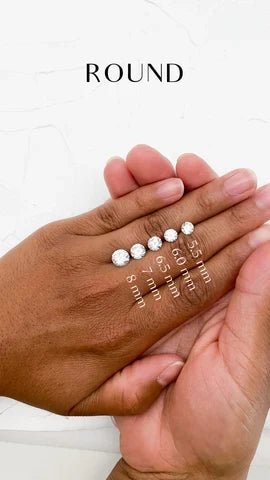
For example, a 1.00 ct round brilliant cut diamond measures roughly 6.5 mm in diameter. A 2.00 to 2.10 ct round brilliant measures around 8.10 to 8.30 mm. A 100% increase in weight yields only about a 25% increase in physical diameter!
This mathematical relationship is used to calculate the "apparent carat equivalent." This metric compares the face-up area of a specific diamond to an ideal-cut reference stone of the same shape. If a poorly cut 1.20 ct diamond has a deep pavilion, its millimeter dimensions might only match those of an ideal-cut 1.00 ct stone. In this case, its apparent carat equivalent is only 1.00 ct.
Conversely, a well-proportioned, slightly elongated shape might have an apparent carat equivalent higher than its actual weight.
How Elongated Shapes Maximize Finger Coverage
If your goal is to maximize the visual impact of your diamond without blowing past your budget, elongated shapes are your best friend. Shapes like the oval cut, pear cut, and marquise cut distribute their physical volume along a longer vertical axis.
This creates a powerful visual illusion. Because these cuts cover more of the finger's length, they appear much larger than a round or princess cut of the exact same carat weight.
For instance, comparing a 1.00 ct round diamond (6.5 mm) to a 1.00 ct oval diamond (8.12 x 5.41 mm) clearly demonstrates this effect. The oval's 8.12 mm length creates an elongated, elegant look that naturally flatters the hand while providing excellent finger coverage.
The Science of Finger Coverage and Ring Sizes
The visual impact of any diamond is entirely relative to the size of the finger wearing it. A 1.00 ct diamond that looks absolutely massive on a US size 4 finger will look noticeably more modest on a US size 8 finger.
This is due to the physical width of the finger. A US size 4 finger is approximately 14.8 mm wide, meaning a 6.5 mm round diamond will cover roughly 44% of the finger's width. A US size 8 finger is about 18.2 mm wide, reducing that same diamond's relative coverage to just 35%.
When you begin planning your ring design, keeping these proportions in mind will save you from unexpected surprises. If you are just starting out on this journey, our guide on How To Start Engagement Ring Shopping is a fantastic resource to help you set expectations.
Why Stock Photos Lie About Diamond Size
It is a common industry practice for online jewelry retailers to showcase their rings using highly optimized stock photos. What they rarely mention is that these photos are almost exclusively shot on professional hand models with US size 4 or 5 fingers.
Because these fingers are exceptionally slender, the diamonds appear much larger in the photos than they will on the average American woman's finger (which is typically a size 7 or 8).
Relying solely on stock photos can lead to disappointment when the ring finally arrives. This discrepancy is the primary reason why using a dedicated virtual simulator is so important for modern jewelry buyers.
Calculating Finger Coverage Percentage with a Diamond Size on Hand Simulator Online
To combat misleading stock photography, interactive tools use geometric formulas to calculate exactly how much of your finger a diamond will cover. The core formula used by the Diamond Ring Size to Carat Appearance Calculator is:
$$\text{Finger Coverage Percentage} = \left( \frac{\text{Diamond Width (mm)}}{\text{Finger Diameter (mm)}} \right) \times 100\%$$
To see this in action, you can use the Real-Scale Diamond on Hand Simulator \| Ring Size Visualizer . If you input a US ring size 6 (which equates to an approximate finger diameter of 16.5 mm) and pair it with a 1.50 ct round brilliant diamond (measuring roughly 7.4 mm in diameter), the simulator calculates a finger coverage of approximately 45%.
This quantitative approach removes the guesswork, allowing you to choose a diamond shape and carat weight that perfectly match your desired aesthetic.
How to Use a Diamond Size on Hand Simulator Online Effectively
Using a diamond size on hand simulator online is incredibly simple, but getting a highly accurate, true-to-life visualization requires a few key steps.
If you are trying to decide between different styles, pairing simulator measurements with our guide on Which Engagement Ring Should I Get will help narrow down your options.
To get started, we recommend visiting a dedicated platform like GemSize - Gemstone Size Simulator .
Calibrating Your Screen for Real-Scale Accuracy
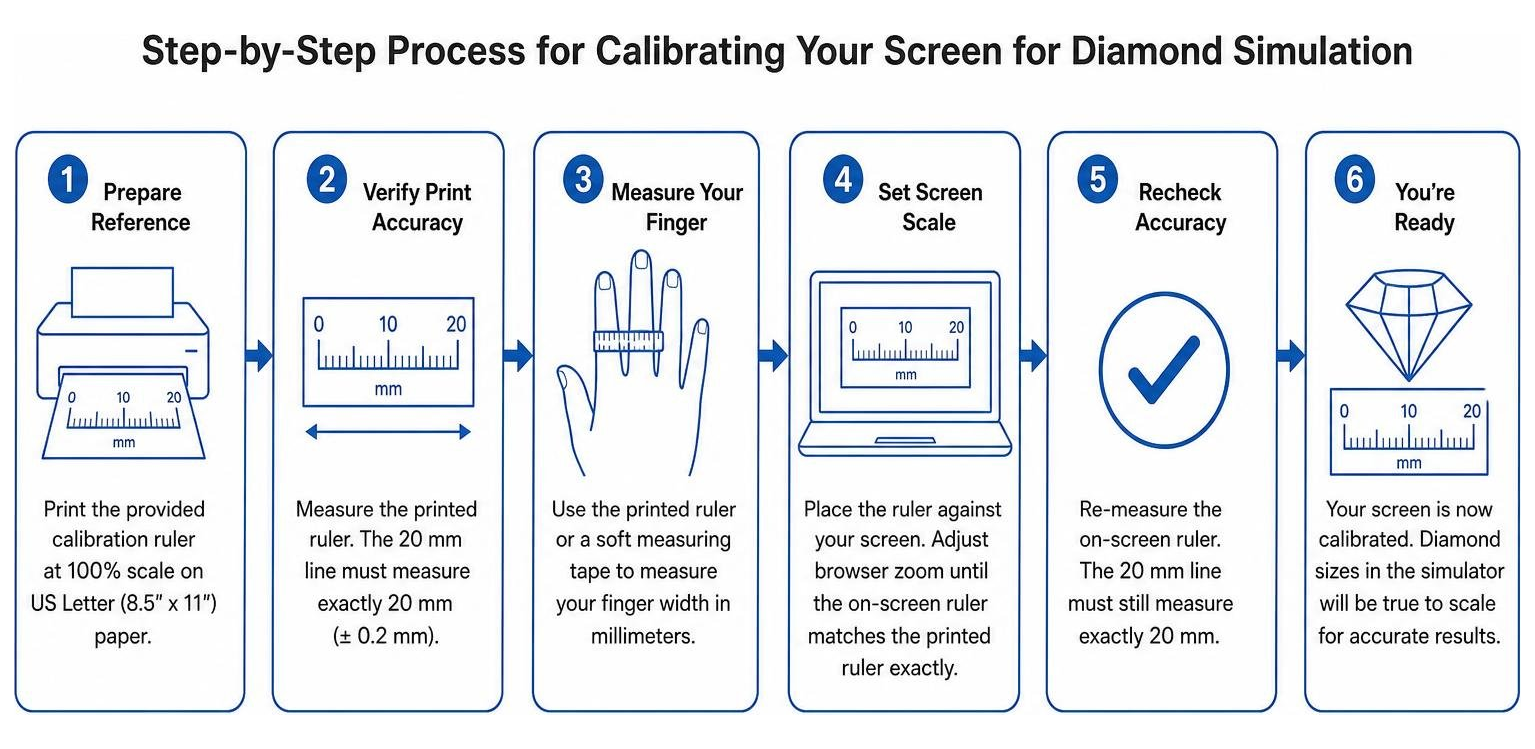
The most critical step in using any online simulator is screen calibration. Because digital screens have widely varying pixel densities, a 6.5 mm diamond might display as 12 mm on a desktop monitor or 4 mm on a mobile screen.
To fix this, virtual simulators require you to input your device's diagonal screen size in inches or hold a standard physical object (like a credit card) up to the screen to calibrate the pixels. Once calibrated, the virtual finger and diamond will display at their exact, real-world physical dimensions.
Comparing Shapes Side-by-Side in a Diamond Size on Hand Simulator Online
Once your screen is calibrated, you can begin comparing different diamond shapes side-by-side. This is the best way to see how shape geometry impacts visual size:
- Round Brilliant: The classic standard. It offers unmatched light performance and sparkle, which naturally makes the stone look bright and prominent, even if its physical footprint is slightly smaller than elongated cuts.
- Princess Cut: A beautiful square cut that concentrates its weight diagonally. Because of its square shape, a 1.00 ct princess cut (5.51 mm) has a narrower width than a 1.00 ct round, making it look slightly smaller face-up.
- Cushion Cut: Soft, rounded corners that offer a romantic, vintage feel. Cushions are typically cut deep, meaning they face up slightly smaller than rounds but offer incredible fire.
- Emerald Cut: A step-cut style that emphasizes clarity and long, elegant lines. It provides an understated, sophisticated look on the finger.
Common Mistakes When Estimating Diamond Size Virtually
While virtual simulators are incredibly helpful, it is easy to make a few common missteps if you only focus on the loose diamond's dimensions.
The Role of Setting Styles and Band Width
A loose diamond's millimeter dimensions are only one part of the visual equation. The setting style and the width of the metal band play a massive role in how large the diamond ultimately appears on the hand:
- Solitaire Settings: A slender, delicate band (such as 1.5 mm to 1.8 mm) makes the center diamond stand out dramatically, making the stone look larger.
- Halo Settings: Surrounding the center stone with a border of small accent diamonds (melee) can make a 1.00 ct center stone look like a 2.00 ct diamond from a distance.
- Bezel Settings: Wrapping the diamond in a solid collar of metal outlines its perimeter, which can visually expand its apparent size.
To explore how these design choices alter the look of your ring, take a look at our guide on How To Choose A Diamond Ring Setting.
Understanding Melee Diamonds and Accent Stones
Many custom rings feature "melee diamonds"—tiny diamonds weighing under 0.20 carats (often between 0.005 and 0.15 ct). Rather than being measured individually by carat weight, these small stones are sorted using precise millimeter sieve sizes.
Using melee diamonds in a halo or along the band is an incredibly cost-effective way to add major sparkle and visual footprint to your ring without the high cost of a larger single center stone.
Frequently Asked Questions About Diamond Size Simulators
Which diamond shape faces up the largest on the hand?
The marquise cut faces up the largest relative to its carat weight. Because of its long, pointed oval shape, it has a very shallow depth and a massive face-up footprint. A 1.00 ct marquise typically measures around 10.00 x 5.00 mm, offering an incredibly large visual presence on the finger.
How many millimeters is a 1-carat round brilliant diamond?
An ideal-cut 1.00-carat round brilliant diamond measures approximately 6.5 mm in diameter. If a 1.00 ct round diamond measures under 6.3 mm, it is likely cut too deep; if it measures over 6.7 mm, it is likely cut too shallow.
Can I trust a digital simulator for lab-grown diamonds?
Yes, absolutely. Lab-grown diamonds share the exact same physical, chemical, and optical properties as natural diamonds. From a geometric standpoint, a 1.50 ct lab-grown round brilliant and a 1.50 ct natural round brilliant will have identical millimeter dimensions and look exactly the same on a virtual simulator.
Conclusion

A diamond size on hand simulator online is an invaluable tool for narrowing down your favorite shapes, understanding finger coverage, and ensuring you get the most visual impact for your budget.
However, while digital tools are a fantastic place to start, they cannot fully capture how a ring catches the light, how the weight feels on your finger, or how a specific metal color complements your skin tone.
At White Diamonds in Ogden, Utah, we believe that buying an engagement ring should be an enjoyable, pressure-free experience. We specialize in custom jewelry design, offering personalized consultations where you can try on real physical model rings. This allows you to compare different diamond sizes and settings in person, ensuring your final design fits your personal style, timeline, and budget perfectly.
Ready to take the next step? Read our guide on What Diamond Carat Size Is Right For You and book a personalized consultation with us today to bring your dream ring to life!